





The suwo package aims to simplify the retrieval of nature media (mostly photos, audio files and videos) across multiple online biodiversity databases. The five major media repositories accessed by this package (GBIF, iNaturalist, Macaulay Library, WikiAves, and Xeno-Canto) collectively host more than 250 million media files. Such media are increasingly used in diverse fields, ranging from ecology and evolutionary biology (e.g., trait evolution) to wildlife monitoring and conservation (e.g., for training species detection models). The ability to access and download large amounts of media files and their associated metadata from a single interface thus provides a uniquely powerful resource for facilitating research and conservation efforts.
The main features of the package are:
- Obtaining media metadata from online repositories
- Downloading associated media files
- Updating data sets with new records
Installing suwo
To install the latest developmental version from github run:
install.packages("suwo", repos = c(
  'https://ropensci.r-universe.dev',
  'https://cloud.r-project.org'
))

#load package
library(suwo)
Basic workflow for obtaining nature media files
Obtaining nature media using suwo follows a basic sequence. The following diagram illustrates this workflow and the main functions involved:
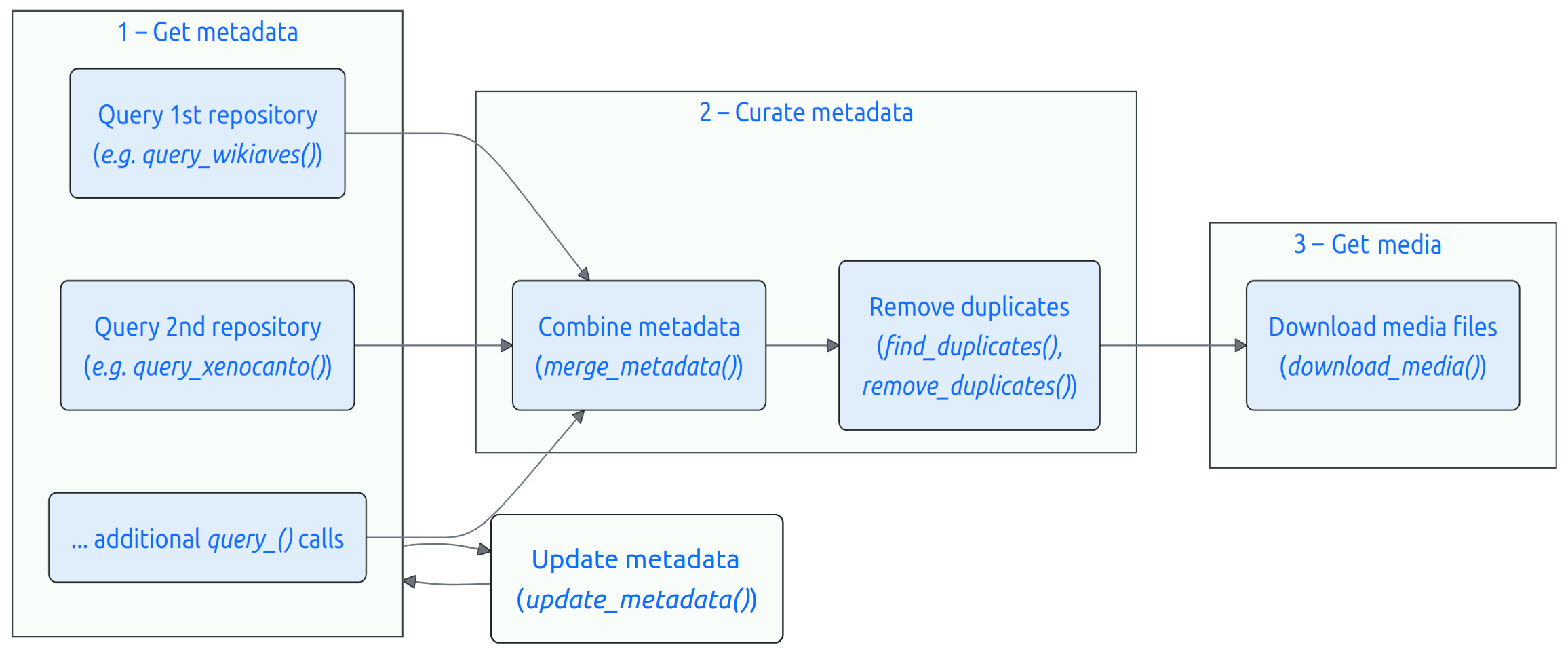
Take a look at the package vignette for an overview of the workflow and the core querying functions.
Quick example
Here is a minimal example that queries GBIF for images of a species and downloads the resulting media files:
library(suwo)

# query GBIF for Amanita zambiana images
a_zam <- query_gbif(species = "Amanita zambiana", format = "image")

# create folder for the downloaded images
out_folder <- file.path(tempdir(), "amanita_zambiana")
dir.create(out_folder)

# download the media files
azam_files <- download_media(metadata = a_zam, path = out_folder)
Articles
In addition to the package overview, these articles cover specific use cases in more detail:
- Package overview: introduces the basic workflow and core querying functions
-
Explore geographic variation: maps the geographic origin of media obtained with
suwo - Xeno-Canto annotations: shows how to retrieve and work with annotations from Xeno-Canto recordings
Intended use and responsible practices
The suwo package is designed exclusively for non-commercial, scientific purposes, including research, education, and conservation. Commercial use of data or media retrieved through this package is the user’s responsibility and is allowed only when the applicable license of the source database explicitly permits such use, or when explicit, separate permission has been obtained directly from the original source platforms or rights holders. Users must comply with the specific terms of service and data-use policies of each source database, which may require attribution and may further restrict commercial application. The package developers assume no liability for misuse of the retrieved data or for violations of third-party terms of service.
Citation
Please cite suwo as follows:
Araya-Salas M, Elizondo-Calvo J, Rico-Guevara A (2026). suwo: Access Nature Media Repositories. R package version 0.2.2, https://docs.ropensci.org/suwo/.