




What does tidyhydat do?
- Provides functions (
available_*) that combine validated historical data with provisional real-time data. - Provides functions (
hy_*) that access hydrometric data from the HYDAT database or web service, a national archive of Canadian hydrometric data and return tidy data. - Provides functions (
realtime_*) that access Environment and Climate Change Canada’s real-time hydrometric data source. - Provides functions (
search_*) that can search through the approximately 7000 stations in the database and aid in generating station vectors - Keep functions as simple as possible. For example, for daily flows, the
hy_daily_flows()function queries the database, tidies the data and returns a tibble of daily flows.
Installation
You can install tidyhydat from CRAN:
To install the development version of the tidyhydat package, you can install directly from the rOpenSci development server:
Usage
More documentation on tidyhydat can found at the rOpenSci doc page: https://docs.ropensci.org/tidyhydat/
When you install tidyhydat, several other packages will be installed as well. One of those packages, dplyr, is useful for data manipulations and is used regularly here. To use actually use dplyr in a session you must explicitly load it. A helpful dplyr tutorial can be found here.
HYDAT download
To use many of the functions in the tidyhydat package you will need to download a version of the HYDAT database, Environment and Climate Change Canada’s database of historical hydrometric data then tell R where to find the database. Conveniently tidyhydat does all this for you via:
This downloads (with your permission) the most recent version of HYDAT and then saves it in a location on your computer where tidyhydat’s function will look for it. Do be patient though as this can take a long time! To see where HYDAT was saved you can run hy_default_db(). Now that you have HYDAT downloaded and ready to go, you are all set to begin looking at Canadian hydrometric data.
Combining validated and provisional data
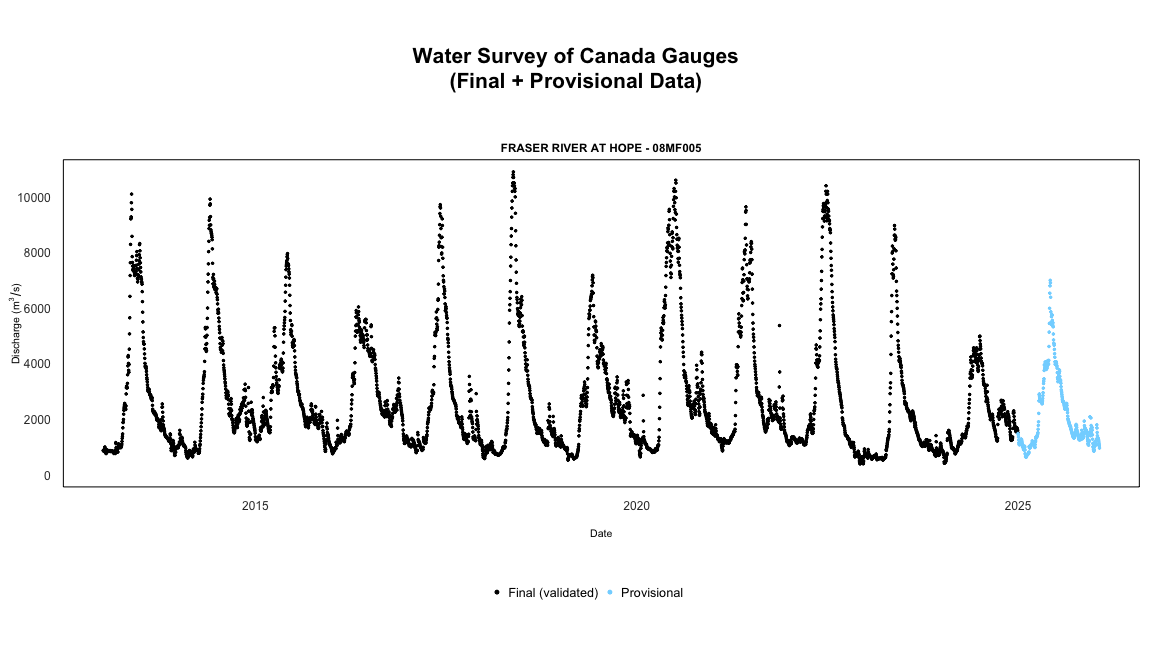
For a complete record combining validated historical data with recent provisional data use the available_flows and available_levels functions.
available_flows(
  station_number = "08MF005",
  start_date = "2020-01-01",
  end_date = Sys.Date()
)
#>   Queried on: 2026-01-26 23:00:31.03418 (UTC)
#>   Historical data source: HYDAT
#>   Overall date range: 2020-01-01 to 2026-01-26
#>   Flow records by approval status:
#>     final: 1,827
#>     provisional: 391
#>   Station(s) returned: 1
#>   All stations successfully retrieved.
#>   Use summary() for per-station date ranges.
#> # A tibble: 2,218 × 6
#>    STATION_NUMBER Date       Parameter Value Symbol Approval
#>    <chr>          <date>     <chr>     <dbl> <chr>  <chr>
#>  1 08MF005        2020-01-01 Flow       1340 <NA>   final
#>  2 08MF005        2020-01-02 Flow       1330 <NA>   final
#>  3 08MF005        2020-01-03 Flow       1310 <NA>   final
#>  4 08MF005        2020-01-04 Flow       1420 <NA>   final
#>  5 08MF005        2020-01-05 Flow       1350 <NA>   final
#>  6 08MF005        2020-01-06 Flow       1310 <NA>   final
#>  7 08MF005        2020-01-07 Flow       1280 <NA>   final
#>  8 08MF005        2020-01-08 Flow       1320 <NA>   final
#>  9 08MF005        2020-01-09 Flow       1230 <NA>   final
#> 10 08MF005        2020-01-10 Flow       1210 <NA>   final
#> # ℹ 2,208 more rows
Use summary() to see date ranges and record counts by station:
flows <- available_flows(
  station_number = c("08MF005", "08NM116"),
  start_date = "2020-01-01"
)
summary(flows)
#> # A tibble: 2 × 7
#>   STATION_NUMBER final_start final_end  final_n provisional_start
#>   <chr>          <date>      <date>       <int> <date>
#> 1 08MF005        2020-01-01  2024-12-31    1827 2025-01-01
#> 2 08NM116        2020-01-01  2023-12-31    1461 2025-01-01
#> # ℹ 2 more variables: provisional_end <date>, provisional_n <int>
Note that provisional data is aggregated to daily means to match the daily format of HYDAT data. For non-aggregated real-time data at sub-daily intervals, use realtime_ws() directly.
Real-time
To download real-time data using the datamart we can use approximately the same conventions discussed above. Using realtime_dd() we can easily select specific stations by supplying a station of interest:
realtime_dd(station_number = "08MF005")
#>   Queried on: 2026-01-26 23:00:37.058285 (UTC)
#>   Date range: 2025-12-27 to 2026-01-26
#> # A tibble: 17,622 × 8
#>    STATION_NUMBER PROV_TERR_STATE_LOC Date                Parameter Value Grade
#>    <chr>          <chr>               <dttm>              <chr>     <dbl> <chr>
#>  1 08MF005        BC                  2025-12-27 08:00:00 Flow       1030 <NA>
#>  2 08MF005        BC                  2025-12-27 08:05:00 Flow       1030 <NA>
#>  3 08MF005        BC                  2025-12-27 08:10:00 Flow       1030 <NA>
#>  4 08MF005        BC                  2025-12-27 08:15:00 Flow       1030 <NA>
#>  5 08MF005        BC                  2025-12-27 08:20:00 Flow       1030 <NA>
#>  6 08MF005        BC                  2025-12-27 08:25:00 Flow       1030 <NA>
#>  7 08MF005        BC                  2025-12-27 08:30:00 Flow       1030 <NA>
#>  8 08MF005        BC                  2025-12-27 08:35:00 Flow       1030 <NA>
#>  9 08MF005        BC                  2025-12-27 08:40:00 Flow       1030 <NA>
#> 10 08MF005        BC                  2025-12-27 08:45:00 Flow       1030 <NA>
#> # ℹ 17,612 more rows
#> # ℹ 2 more variables: Symbol <chr>, Code <chr>
Or we can use realtime_ws:
realtime_ws(
  station_number = "08MF005",
  parameters = c(46, 5), ## see param_id for a list of codes
  start_date = Sys.Date() - 14,
  end_date = Sys.Date()
)
#>   Queried on: 2026-01-26 23:00:38.302716 (UTC)
#>   Date range: 2026-01-12 to 2026-01-26
#>   Station(s) returned: 1
#>   All stations successfully retrieved.
#>   All parameters successfully retrieved.
#> # A tibble: 4,658 × 12
#>    STATION_NUMBER Date                Name_En  Value Unit  Grade Symbol Approval
#>    <chr>          <dttm>              <chr>    <dbl> <chr> <lgl> <chr>  <chr>
#>  1 08MF005        2026-01-12 00:00:00 Water t…  5.1  °C    NA    <NA>   Provisi…
#>  2 08MF005        2026-01-12 01:00:00 Water t…  5.11 °C    NA    <NA>   Provisi…
#>  3 08MF005        2026-01-12 02:00:00 Water t…  5.09 °C    NA    <NA>   Provisi…
#>  4 08MF005        2026-01-12 03:00:00 Water t…  5.09 °C    NA    <NA>   Provisi…
#>  5 08MF005        2026-01-12 04:00:00 Water t…  5.1  °C    NA    <NA>   Provisi…
#>  6 08MF005        2026-01-12 05:00:00 Water t…  5.1  °C    NA    <NA>   Provisi…
#>  7 08MF005        2026-01-12 06:00:00 Water t…  5.1  °C    NA    <NA>   Provisi…
#>  8 08MF005        2026-01-12 07:00:00 Water t…  5.1  °C    NA    <NA>   Provisi…
#>  9 08MF005        2026-01-12 08:00:00 Water t…  5.1  °C    NA    <NA>   Provisi…
#> 10 08MF005        2026-01-12 09:00:00 Water t…  5.11 °C    NA    <NA>   Provisi…
#> # ℹ 4,648 more rows
#> # ℹ 4 more variables: Parameter <dbl>, Code <chr>, Qualifier <chr>,
#> #   Qualifiers <lgl>
Using only HYDAT
If you wish to use only the final approved data in HYDAT database you can use:
hy_daily_flows(
  station_number = "08MF005",
  start_date = "2020-01-01",
  end_date = "2020-12-31"
)
#>   Queried from version of HYDAT released on 2025-10-14
#>    Observations:                      366
#>    Measurement flags:                 0
#>    Parameter(s):                      Flow
#>    Date range:                        2020-01-01 to 2020-12-31
#>    Station(s) returned:               1
#>    Stations requested but not returned:
#>     All stations returned.
#> # A tibble: 366 × 5
#>    STATION_NUMBER Date       Parameter Value Symbol
#>    <chr>          <date>     <chr>     <dbl> <chr>
#>  1 08MF005        2020-01-01 Flow       1340 <NA>
#>  2 08MF005        2020-01-02 Flow       1330 <NA>
#>  3 08MF005        2020-01-03 Flow       1310 <NA>
#>  4 08MF005        2020-01-04 Flow       1420 <NA>
#>  5 08MF005        2020-01-05 Flow       1350 <NA>
#>  6 08MF005        2020-01-06 Flow       1310 <NA>
#>  7 08MF005        2020-01-07 Flow       1280 <NA>
#>  8 08MF005        2020-01-08 Flow       1320 <NA>
#>  9 08MF005        2020-01-09 Flow       1230 <NA>
#> 10 08MF005        2020-01-10 Flow       1210 <NA>
#> # ℹ 356 more rows
Using the web service without HYDAT
For smaller queries where downloading the entire HYDAT database is unnecessary, you can use hy_daily_flows() and hy_daily_levels() with hydat_path = FALSE to access historical daily data directly from the web service:
hy_daily_flows(
  station_number = "08MF005",
  hydat_path = FALSE,
  start_date = "2020-01-01",
  end_date = "2020-12-31"
)
#>   Queried on: 2026-01-26 23:00:39.500049 (UTC)
#>   Date range: 2020-01-01 to 2020-12-31
#>   Station(s) returned: 1
#>   All stations successfully retrieved.
#> # A tibble: 366 × 5
#>    STATION_NUMBER Date       Parameter       Value Symbol
#>    <chr>          <date>     <chr>           <dbl> <chr>
#>  1 08MF005        2020-01-01 discharge/débit  1340 <NA>
#>  2 08MF005        2020-01-02 discharge/débit  1330 <NA>
#>  3 08MF005        2020-01-03 discharge/débit  1310 <NA>
#>  4 08MF005        2020-01-04 discharge/débit  1420 <NA>
#>  5 08MF005        2020-01-05 discharge/débit  1350 <NA>
#>  6 08MF005        2020-01-06 discharge/débit  1310 <NA>
#>  7 08MF005        2020-01-07 discharge/débit  1280 <NA>
#>  8 08MF005        2020-01-08 discharge/débit  1320 <NA>
#>  9 08MF005        2020-01-09 discharge/débit  1230 <NA>
#> 10 08MF005        2020-01-10 discharge/débit  1210 <NA>
#> # ℹ 356 more rows
Compare realtime_ws and realtime_dd
tidyhydat provides two methods to download realtime data. realtime_dd() provides a function to import .csv files from here. realtime_ws() is an client for a web service hosted by ECCC. realtime_ws() has several difference to realtime_dd(). These include:
-
Speed: The
realtime_ws()is much faster for larger queries (i.e. many stations). For single station queries torealtime_dd()is more appropriate. -
Length of record:
realtime_ws()records goes back further in time. -
Type of parameters:
realtime_dd()are restricted to river flow (either flow and level) data. In contrastrealtime_ws()can download several different parameters depending on what is available for that station. Seedata("param_id")for a list and explanation of the parameters. -
Date/Time filtering:
realtime_ws()provides argument to select a date range. Selecting a data range withrealtime_dd()is not possible until after all files have been downloaded.
Getting Help or Reporting an Issue
To report bugs/issues/feature requests, please file an issue.
These are very welcome!
How to Contribute
If you would like to contribute to the package, please see our CONTRIBUTING guidelines.
Please note that this project is released with a Contributor Code of Conduct. By participating in this project you agree to abide by its terms.
Citation
Get citation information for tidyhydat in R by running:
To cite package 'tidyhydat' in publications use:

  Albers S (2017). "tidyhydat: Extract and Tidy Canadian Hydrometric
  Data." _The Journal of Open Source Software_, *2*(20).
  doi:10.21105/joss.00511 <https://doi.org/10.21105/joss.00511>,
  <http://dx.doi.org/10.21105/joss.00511>.

A BibTeX entry for LaTeX users is

  @Article{,
    title = {tidyhydat: Extract and Tidy Canadian Hydrometric Data},
    author = {Sam Albers},
    doi = {10.21105/joss.00511},
    url = {http://dx.doi.org/10.21105/joss.00511},
    year = {2017},
    publisher = {The Open Journal},
    volume = {2},
    number = {20},
    journal = {The Journal of Open Source Software},
  }
License
Copyright 2017 Province of British Columbia
Licensed under the Apache License, Version 2.0 (the “License”); you may not use this file except in compliance with the License. You may obtain a copy of the License at
https://www.apache.org/licenses/LICENSE-2.0
Unless required by applicable law or agreed to in writing, software distributed under the License is distributed on an “AS IS” BASIS, WITHOUT WARRANTIES OR CONDITIONS OF ANY KIND, either express or implied. See the License for the specific language governing permissions and limitations under the License.